
Download QnAYoutube – Free AI Transcript Extractor for YouTube Videos
Overview
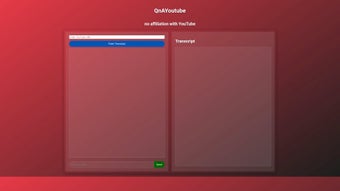
QnAYoutube is a web‑based AI tool that simplifies the process of extracting text from YouTube videos. By leveraging advanced speech‑to‑text algorithms, the service delivers word‑for‑word transcripts in seconds, letting creators, researchers, and marketers turn spoken content into searchable, editable text. The platform offers two core functions: “Fetch Transcript,” which pulls a clean, time‑coded transcript directly from any public YouTube video, and “Send Transcript,” which packages the result into a JSON data structure for easy integration with other applications or data pipelines.
Because QnAYoutube operates independently of YouTube’s native interface, it respects the platform’s usage policies while providing a secure, privacy‑first environment. Users can download the transcript for free, share it across teams, or feed it into downstream tools such as content management systems, analytics dashboards, or AI summarizers. The service is especially valuable for academic research, where accurate citation of video sources is critical, as well as for content creators who want to repurpose video scripts into blog posts, newsletters, or social media snippets.
With a clean UI, instant results, and no need for bulky software installations, QnAYoutube stands out as a practical, lightweight solution for anyone who needs reliable YouTube transcript extraction.
Key Features
- Instant Fetch Transcript: Generate a complete, word‑for‑word transcript from any public YouTube video in under 10 seconds.
- AI‑Powered Accuracy: Utilises state‑of‑the‑art speech recognition models to deliver high‑precision text, even with background noise or multiple speakers.
- JSON Export: Convert the transcript into a structured JSON format, enabling seamless integration with databases, APIs, or custom scripts.
- Secure, No‑Login Access: Users can retrieve transcripts without creating an account, reducing friction and protecting personal data.
- Multi‑Language Support: Handles transcripts in dozens of languages, automatically detecting the spoken language of the video.
- Time‑Stamped Output: Each line of text includes start and end timestamps, making it easy to locate specific moments in the video.
- Copy‑Ready Formatting: Export options include plain text, CSV, and markdown, catering to different workflow preferences.
- Compliance‑Focused Design: Operates under YouTube’s fair‑use guidelines, ensuring that extracted content respects copyright rules.
- Lightweight Web App: Runs entirely in the browser, eliminating the need for downloads, installations, or system updates.
- Free Tier with Unlimited Requests: Users can fetch as many transcripts as needed without hitting a paywall, while premium plans unlock bulk processing and API access.
These features collectively make QnAYoutube a versatile tool for a wide range of use‑cases. For educators, the ability to quickly pull a transcript and share it with students accelerates lesson planning and supports accessibility. Marketing teams can repurpose video interviews into blog articles or SEO‑friendly copy, leveraging the time‑stamped data to link back to exact moments in the original video. Developers appreciate the JSON output because it fits naturally into modern data pipelines, allowing automated workflows that ingest, analyze, and store video content without manual copying. Moreover, the free tier removes financial barriers for hobbyists and small teams, while the secure, no‑login approach safeguards user privacy—an increasingly important consideration in today’s digital landscape.
Installation, Usage & Compatibility
Because QnAYoutube is a cloud‑hosted web application, there is no traditional installation process. Users simply navigate to the official website using any modern browser (Chrome, Firefox, Edge, Safari) on desktop or mobile devices. The responsive design ensures a consistent experience across platforms, whether you’re on Windows, macOS, Linux, Android, or iOS. Here’s a step‑by‑step guide to getting started:
- Open the QnAYoutube portal: Visit qnayoutube.com in your browser.
- Enter the YouTube URL: Paste the link of the video you wish to transcribe into the input field.
- Select language (optional): If the video is not in English, choose the appropriate language from the dropdown to improve accuracy.
- Click “Fetch Transcript”: The AI engine processes the audio and returns a full transcript within seconds.
- Review & edit: The transcript appears in an editable textbox, allowing you to make quick corrections.
- Export options: Choose “Send Transcript” to download the JSON file, or use the “Copy Text” button for plain‑text export.
The entire workflow is designed to be intuitive, with clear progress indicators and error handling for unavailable videos or restricted content. Because the service runs on secure HTTPS connections, all data transmission is encrypted, safeguarding the video URL and the resulting transcript from interception.
Supported Operating Systems: Windows 10/11, macOS Monterey and later, Linux distributions with recent browsers, Android 8.0+ (Chrome or Firefox), iOS 13+ (Safari or Chrome). The tool does not require any additional plugins, Java, or Flash, ensuring compatibility with the most common devices used by content creators today.
For power users, QnAYoutube also offers a simple RESTful API (available with a premium subscription) that accepts POST requests containing a YouTube video ID and returns the JSON transcript. This API follows standard authentication practices using API keys, making it straightforward to integrate into existing automation scripts or third‑party platforms such as Zapier, Integromat, or custom Python workflows.
Pros, Cons & Frequently Asked Questions
Pros
- Free unlimited transcript generation for personal use.
- High accuracy thanks to AI‑driven speech recognition.
- No software download or installation required.
- JSON export simplifies integration with other tools.
- Supports multiple languages and provides timestamps.
- Secure HTTPS connection protects user data.
- Responsive design works on desktop and mobile devices.
Cons
- Limited to public YouTube videos; private or age‑restricted content cannot be processed.
- Free tier does not include bulk API access, which is reserved for paid plans.
- Accuracy may decrease for videos with heavy background music or poor audio quality.
- No built‑in video summarization—users must rely on external tools for summarizing transcripts.
FAQ
Is QnAYoutube really free?
Yes. The core “Fetch Transcript” and “Send Transcript” features are completely free for unlimited personal use. Premium plans are optional and provide API access, bulk processing, and priority support.
Can I extract transcripts from private or age‑restricted videos?
No. QnAYoutube respects YouTube’s privacy settings, so only publicly accessible videos can be processed. Attempting to fetch a private or restricted video will result in an error message.
What languages are supported?
The service automatically detects the spoken language and supports over 30 languages, including English, Spanish, French, German, Mandarin, Japanese, Korean, Arabic, and many more.
How accurate are the transcripts?
Accuracy is typically above 95 % for clear audio with minimal background noise. Complex accents, overlapping speakers, or heavy music can reduce precision, but the tool still provides a solid starting point for manual cleanup.
Is my data stored or shared?
QnAYoutube processes videos in real time and does not retain transcripts after the session ends, unless you explicitly download or save them. All communications are encrypted via HTTPS, and no personal identifiers are logged.
Conclusion
QnAYoutube delivers exactly what its name promises: a quick, reliable, and free way to turn YouTube video speech into usable text. Its AI‑driven accuracy, instant JSON export, and cross‑platform compatibility make it a standout option for educators, marketers, developers, and anyone who regularly works with video content. While it cannot bypass YouTube’s privacy restrictions and the free version lacks bulk API capabilities, those limitations are clearly outlined and do not diminish the core value of the service. Whether you need a single transcript for a research paper or you’re looking to automate content repurposing across a large video library, QnAYoutube provides a secure, user‑friendly solution that eliminates the need for cumbersome software installations. Ready to boost your productivity? Visit qnayoutube.com, paste your video link, and start extracting transcripts in seconds—completely free and without any hidden fees.



.png)



